
Efficiently manage your push notification content by following these detailed steps in the OptiKPI Library.
Navigate to the Library Session
Log into your OptiKPI account and navigate to the Library session.
Create New Content
Click on “+ Create new content” to begin crafting your push notification.
Set Up Notification Basics
- Name: Enter a descriptive name for your notification to help you identify it later.
- Channel: Select “Push Notification” as the channel.
- Tags: Add relevant tags to facilitate easy retrieval and organization.
Compose Your Notification
- Message Title: Input a concise title for your notification, considering character limits for optimal display.
- Message Content: Type the message content directly into the provided text box.
- Message Configuration Account: Choose the appropriate configuration account from which the notification will be sent.
Adding Tracking Links for Push Notifications
OptiKPI allows you to add trackable Call-to-Action (CTA) links in your push notifications. These links are automatically shortened and tracked, helping you monitor customer engagement and click-through rates.
How to Add a Tracking Link in Push Notifications
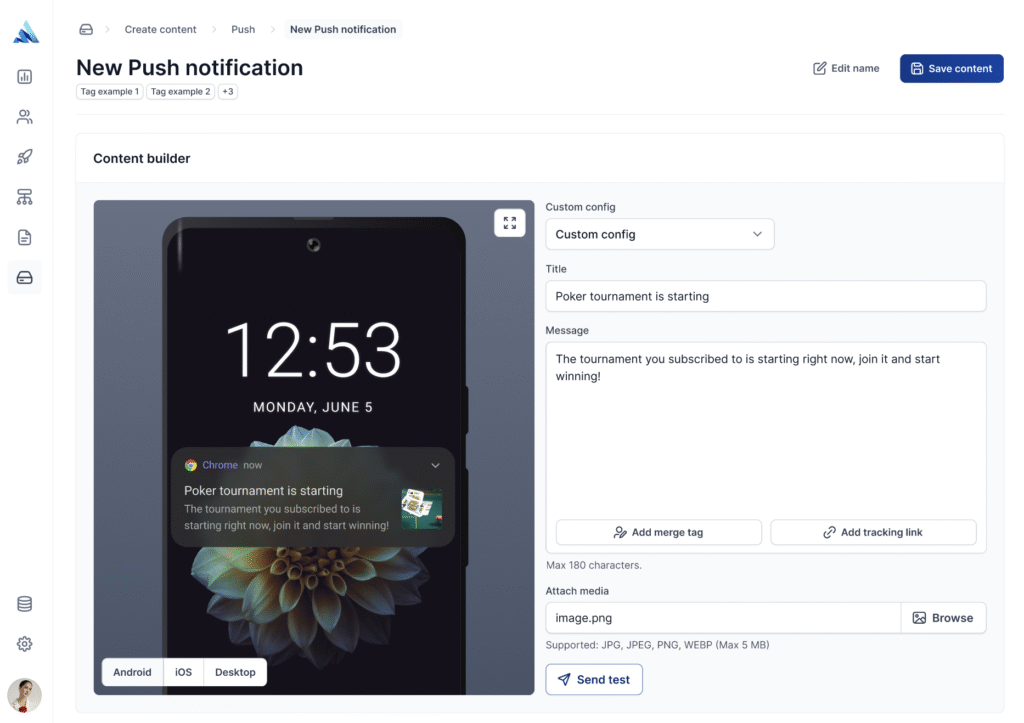
- Click “Add Tracking Link”: In the push notification editor, click the “Add Tracking Link” button to open the link creation popup.
- Enter Your Destination URL: Input the URL you want to redirect users to (e.g., a promotion page, deposit page, or event registration).
- Automatic URL Shortening & Tracking: OptiKPI will shorten the URL using the domain you provided in your account settings. Click-throughs will be automatically tracked, providing insights into user engagement.
Additional Notes on Push Notification Tracking Links
- Placement: The tracking link will be attached to the push notification and triggered when the user clicks on it.
- One Unique Link per Notification: OptiKPI supports only one CTA link per push notification.
- Automatic Campaign Association:For push templates used in multiple campaigns, OptiKPI automatically assigns and tracks the correct CTA links per campaign.
Device-Specific Previews
Preview how the notification will appear on Android, iOS, and desktop devices by selecting the respective preview option. This helps ensure that your message looks great on all platforms.
Save Content
- Once you are satisfied with the push notification draft, click “Save Content” at the top right.
- Your content will be saved in the Library, ready for use in your campaigns.
Text Limits and Best Practices
Web Push Notifications:
- Titles: Typically 40 to 75 characters depending on the browser, OS, and device.
- Descriptions: Range from 50 to 225 characters.
App Push Notifications:
- iOS: Up to 178 characters before text cut-off, with no separate title or description fields.
- Android: Titles up to 65 characters and descriptions up to 240 characters.
Tips for Success
- Clarity and Brevity: Focus on making your messages concise and direct, especially considering the character limits for different devices and platforms.
- Optimize for Visibility: Ensure titles and key messages are visible within the character limits to maximize reader engagement.
Regular Updates: Continuously review and adjust your push notifications based on engagement metrics and feedback.